In today’s digital world, video content has become one of the most powerful ways to communicate ideas, promote products, and engage audiences. From social media platforms to educational websites and business marketing campaigns, videos are everywhere. However, creating professional-quality videos has traditionally required advanced skills, expensive software, and a significant investment of time.
This is where artificial intelligence is making a major difference. AI-powered video tools are transforming the way videos are created by automating complex tasks and simplifying the entire production process. One such tool gaining attention is the Veo 3 AI Video Generator.
This article provides a detailed and unbiased overview of Veo 3 AI Video Generator—how it works, what features it offers, and how it can be used for different purposes. Whether you are a beginner, content creator, marketer, educator, or business owner, this guide will help you understand how AI-based video generation can improve your workflow.
Understanding AI Video Generation
Before exploring Veo 3 specifically, it is important to understand what AI video generation actually means.
AI video generators use machine learning algorithms to analyze input such as text, images, audio, and video clips. Based on this input, the system automatically creates video scenes, applies transitions, adjusts colors, synchronizes audio, and structures the content in a visually appealing way.
Instead of manually editing each frame, users can focus on ideas and storytelling while the AI handles technical aspects such as:
- Scene sequencing
- Visual balance
- Text timing and placement
- Color and lighting optimization
- Smooth transitions
This approach significantly reduces the learning curve and production time.
What Is Veo 3 AI Video Generator?
Veo 3 AI Video Generator is an AI-powered video creation platform designed to help users produce high-quality videos with minimal effort. The tool combines automation with customization, allowing users to maintain creative control while benefiting from intelligent assistance.
Rather than being a traditional video editor that relies heavily on manual timelines and layers, Veo 3 focuses on smart workflows. Users provide content and preferences, and the AI organizes everything into a structured video.
The platform is suitable for a wide range of users, including:
- Beginners with no video editing experience
- Content creators looking to save time
- Marketers producing promotional videos
- Educators creating learning materials
- Small businesses developing brand content
How Veo 3 AI Video Generator Works
The working process of Veo 3 can be broken down into a few simple steps:
1. Input Collection
Users provide basic inputs such as text descriptions, images, video clips, or audio files. This content forms the foundation of the video.
2. AI Analysis
The system analyzes the content to understand context, tone, and purpose. It identifies key elements that should be emphasized visually.
3. Scene Generation
Based on the analysis, Veo 3 automatically generates scenes, arranges content logically, and applies transitions between sections.
4. Visual Enhancement
The AI adjusts colors, lighting, text alignment, and pacing to create a balanced and professional look.
5. Preview and Export
Users can preview the final output and export the video in supported formats suitable for different platforms.
This workflow eliminates much of the manual editing traditionally required.
Key Features of Veo 3 AI Video Generator
1. User-Friendly Interface
One of the biggest advantages of Veo 3 is its clean and intuitive interface. Even users with no prior experience can navigate the dashboard easily.
2. Smart Templates
The platform offers a variety of templates for different use cases such as social media, presentations, educational videos, and promotional content. These templates serve as a starting point and can be customized.
3. Customization Options
While automation is a core feature, users still have control over design elements. You can modify text styles, layouts, colors, and media placement to match your brand or personal preference.
4. AI-Powered Enhancements
The AI assists with transitions, scene timing, and overall visual balance. This helps maintain consistency throughout the video.
5. Modern Output Formats
Videos can be exported in commonly used formats that are compatible with websites, social platforms, and presentation tools.
Getting Started with Veo 3 AI Video Generator
Account Setup
To begin using Veo 3, users need to create an account on the platform. The signup process typically requires basic information such as an email address and password.
Dashboard Overview
Once logged in, users are greeted with a dashboard that provides access to:
- New project creation
- Template library
- Media uploads
- Saved projects
- Export options
The layout is designed to keep everything accessible in one place.
Understanding Feature Access
Like many digital platforms, Veo 3 may offer both limited-access and advanced options depending on the plan. Users should always review official documentation to understand feature availability.
Step-by-Step Guide to Creating a Video with Veo 3
Step 1: Choose a Template or Start from Scratch
Users can select a template that matches their goal or start with a blank project for full creative control.
Step 2: Add Content
Insert text, images, video clips, and audio files. The AI automatically aligns and structures the content.
Step 3: Apply AI Enhancements
Enable AI-based enhancements such as automatic transitions, color correction, and scene balancing.
Step 4: Preview the Video
Review the generated video to ensure everything flows smoothly and matches your expectations.
Step 5: Export
Export the video in the desired format and resolution based on where it will be published.
Advanced Tips for Creating Better Videos
Focus on Clear Messaging
AI can enhance visuals, but clear messaging still matters. Keep text concise and focused.
Use Consistent Visual Style
Stick to a consistent color palette and font style for a professional appearance.
Optimize for the Target Platform
Different platforms require different aspect ratios and video lengths. Adjust accordingly.
Add Audio Carefully
Background music and voice-overs should enhance the message, not overpower it.
Practical Use Cases of Veo 3 AI Video Generator
Marketing and Promotion
Businesses can use Veo 3 to create promotional videos, brand stories, and product showcases that look polished and engaging.
Social Media Content
Short, visually appealing videos are ideal for social media platforms. AI-generated videos help maintain consistency and quality.
Education and Training
Educators can create explainer videos, tutorials, and course materials with clear visuals and structure.
Personal and Creative Projects
Individuals can use the tool for storytelling, event highlights, and creative experiments without professional editing tools.
Sample AI Prompts (Original and Safe)
Image Prompt Example
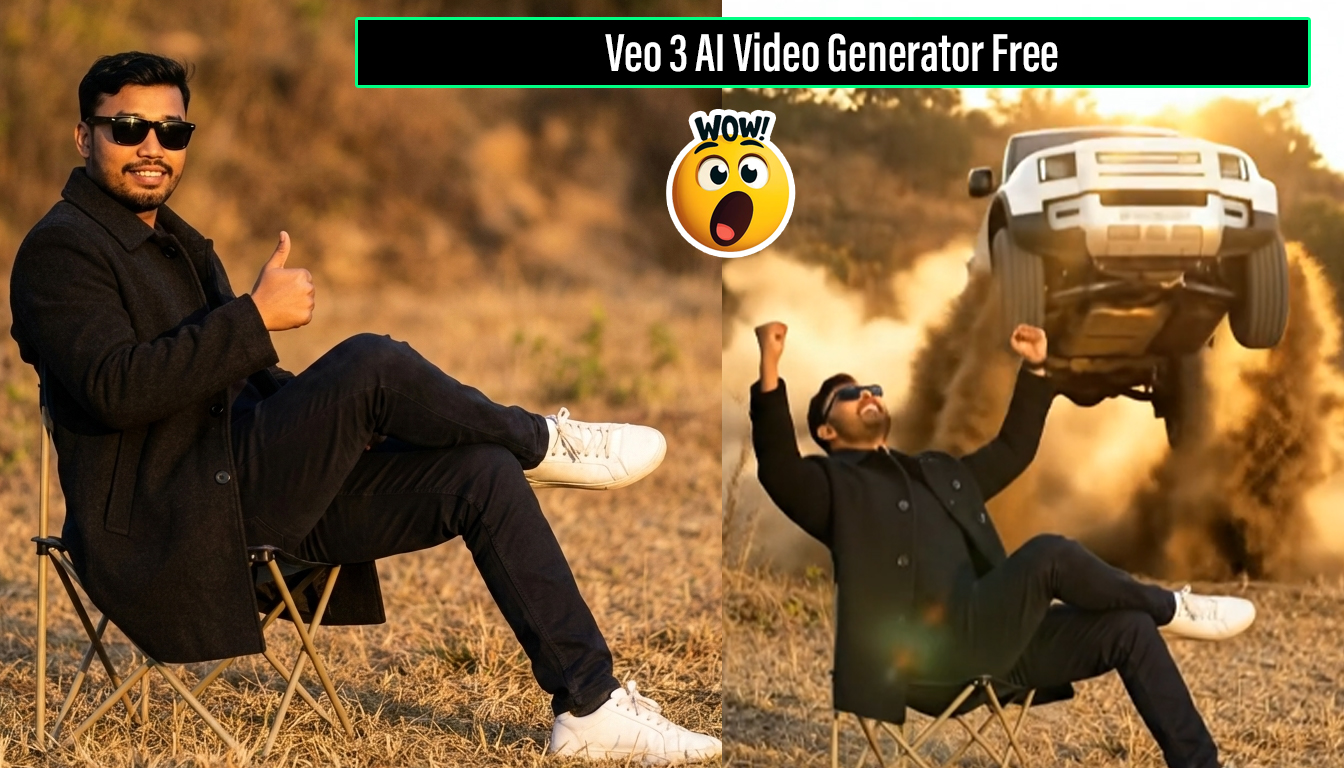
A cinematic outdoor portrait of a confident young man seated on a folding chair in an open dry field. He wears dark clothing and sunglasses, with warm golden-hour lighting, shallow depth of field, and natural earthy tones.
Video Prompt Example
A white SUV enters the scene dynamically from behind, moving forward with cinematic motion, dust particles rising in the air, creating a dramatic and energetic visual moment.
Advantages of Using AI-Based Video Tools
- Saves time and effort
- Reduces technical complexity
- Improves consistency and quality
- Suitable for beginners and professionals
- Scales easily for regular content creation
Limitations to Keep in Mind
While AI video generators offer many benefits, users should also be aware of potential limitations:
- Limited creative freedom compared to advanced manual editing
- Dependence on templates and presets
- Feature availability may vary by plan
Understanding these limitations helps set realistic expectations.
Veo 3 AI video generator free
AI video generation is evolving rapidly. As technology improves, tools like Veo 3 are expected to offer even more realistic visuals, smarter automation, and greater creative control.
In the future, AI may play a central role in video storytelling, allowing creators to focus almost entirely on ideas and narratives rather than technical execution.
1 Copy this prompt for image:
A cinematic outdoor portrait of a young man sitting confidently on a small folding chair in an open dry field. He is wearing a dark coat, black sunglasses, dark pants, and white sneakers. His legs are crossed, posture relaxed and authoritative. Warm golden-hour sunlight, shallow depth of field, blurred natural background with dry grass and earthy tones. Realistic photography, 4K, cinematic color grading, sharp focus, moody atmosphere.
| Car Jump |
|---|
| Make image to car Jump Image |
| New |
2 Copy this prompt for Video:
A cinematic golden-hour scene. A man in black sits calmly on a chair in an open field. From behind, a jeep races forward. The man raises his hand and snaps his fingers. Instant movie-style jump cut — the jeep flies through the air in slow motion with dust and motion blur, then lands perfectly right behind him. He stays calm. Epic cinematic lighting, dramatic dust, shallow depth of field, Hollywood action vibe, ultra-realistic, 4K.
| Ai Video |
|---|
| Make Image to Car jump Video |
| Tricks |
Veo 3 AI Video Generator represents a growing trend toward simplified, AI-assisted video creation. It bridges the gap between creativity and technology by making video production more accessible to everyone.
Whether you are creating marketing content, educational materials, or personal videos, AI-powered tools can significantly improve efficiency and consistency. Veo 3 is one example of how artificial intelligence is reshaping the video creation landscape.
If you are exploring modern solutions for video production, understanding and experimenting with AI video generators can be a valuable step forward.